How to print text messages for court from an iPhone
Text messages often matter in custody, harassment, landlord and small-claims cases. A complete, dated and readable copy is easier for your lawyer to use and harder for the other side to dispute.
Not legal advice
This guide is general information. Rules on evidence differ between courts, states and countries. Your lawyer, or the court clerk if you don’t have one, can tell you exactly what your court expects.
What lawyers and courts usually look for
- The whole conversation for the dates that matter, not single messages. A few cropped screenshots invite the question of what was left out.
- The date and time of each message, so events can be put in order.
- Who sent each message: the contact’s name and, ideally, their phone number or email address.
- Unchanged messages: no edits, retyping or notes on the copies you hand in.
- Readable pages in date order. Your lawyer may add page or exhibit numbers.
Step by step
1. Keep the original messages on your iPhone
Don’t delete the conversation, even after you’ve printed it. Your lawyer or the court may want to see the messages on the phone itself. In Settings, open Messages and check that Keep Messages is set to Forever, so iOS doesn’t remove older messages. Back up your iPhone to iCloud or a computer.
2. Export the full conversation as a PDF
With Texts2PDF, run the mini-app shortcut, choose the conversation and set a start and end date that cover the events in your case. You get one PDF with every message in order, each with its sender, date and time, without screenshots or a computer.
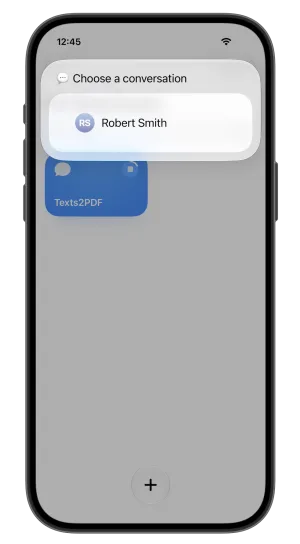
Choose the conversation 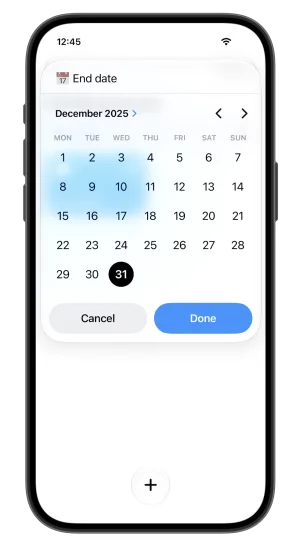
Set the dates 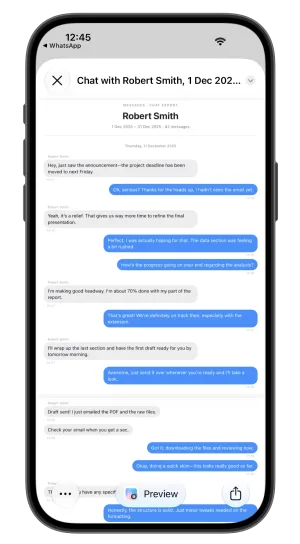
Every message, dated
3. Check the PDF before you print
Make sure the dates cover everything relevant, the contact is the right person and nothing is missing. The PDF shows the contact’s name as it’s saved on your phone, so write down their phone number or email address too: tap their name at the top of the conversation in Messages to see it. Your lawyer may need it to show who sent the messages.
4. Print clean copies
Print one unmarked copy for each person who needs it, usually your lawyer, the court and the other side. Ask your lawyer how many. From the PDF, tap the share button and choose Print, or save it to Files and print it from a computer.
5. Mark up a separate copy for yourself
Highlight the key messages and add notes on your own copy, so you can find them quickly when you talk to your lawyer or the judge. Keep the copies you hand in clean.
6. Send your lawyer the file too
Email or AirDrop the PDF itself. A digital copy is easier to search and share, and many courts accept documents filed electronically.
How do you authenticate text messages for court?
Authenticating a text message means showing that it is what you say it is: that it really came from the person you say sent it, and that it hasn’t been changed. In U.S. federal courts this falls under Federal Rule of Evidence 901, and states have similar rules. In practice it’s often done through:
- your own testimony that you sent or received the messages and that the copy is accurate
- details that tie the messages to the sender, such as their phone number, how they’re saved in your contacts, nicknames, facts only they would know, and replies that fit the conversation
- the other person admitting they sent them
- in disputed cases, phone company records or an expert examining the phone
A complete, dated export helps with all of this, because it shows each message in context with its date and sender. Your lawyer will know which of these your court expects.
Mistakes to avoid
- Screenshots of single messages, without dates or the contact’s name
- Deleting the conversation from your phone after printing it
- Editing, retyping or writing on the copies you hand in
- Mixing several conversations in one printout without labelling them
- Leaving out messages that don’t help your side. The other side may have them too.
Questions
Are screenshots of text messages admissible in court?
Often they can be, if they are relevant and you can show they are genuine. But screenshots tend to be incomplete and missing dates, which gives the other side room to question them. A complete, dated copy of the conversation is easier to authenticate and easier for a judge to follow. Ask your lawyer what your court accepts.
Can I print text messages for court for free?
Yes. You can take screenshots and print them from the Photos app, or print the conversation from Messages on a Mac. Texts2PDF costs $9.99 once and puts the date, time and sender on every message, which screenshots don’t.
Do text messages for court need to be printed in color?
There’s no general rule. Color makes it easy to see who sent what. Texts2PDF also names the sender above each message they sent, so a black and white printout still reads clearly. Ask your lawyer or the court clerk what they prefer.
How far back can I export text messages?
As far back as the messages on your iPhone go. If Keep Messages in Settings is set to 30 days or 1 year, older messages have already been deleted from the phone. Set it to Forever to stop that from happening.
Can I get my text messages from my phone company?
Phone companies usually keep records of when messages were sent and between which numbers, but rarely what they said, and only for a limited time. iMessages are sent over the internet, so they usually don’t appear in those records at all. If carrier records are needed, your lawyer can request them.
Give your lawyer the whole thread
Texts2PDF exports a Messages conversation from your iPhone to one dated PDF in about a minute. One payment of $9.99, and nothing leaves your phone.
Texts2PDF
A mini-app shortcut that exports a Messages conversation from your iPhone to one PDF, with the date, time and sender on every message. Nothing is uploaded.
Watch the demo